Researching Historical Periods using Newspapers
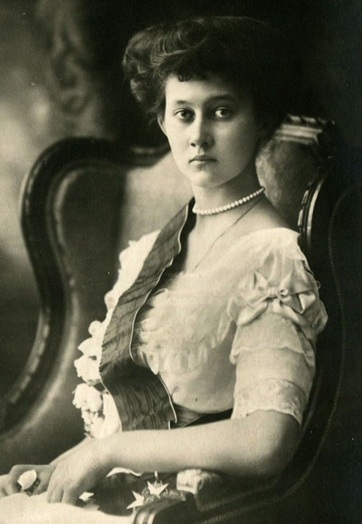
Photo credit: By Bain News Service, publisher – https://mariro.livejournal.com/303057.html, Public Domain, https://commons.wikimedia.org/w/index.php?curid=107299247
This project offers an alternative means to explore historical periods through newspapers published during the lifetimes of notable individuals. In this project, we investigate the means by which Luxembourgish newspapers treated information during historical periods, and take, as an example, the First World War (WWI).
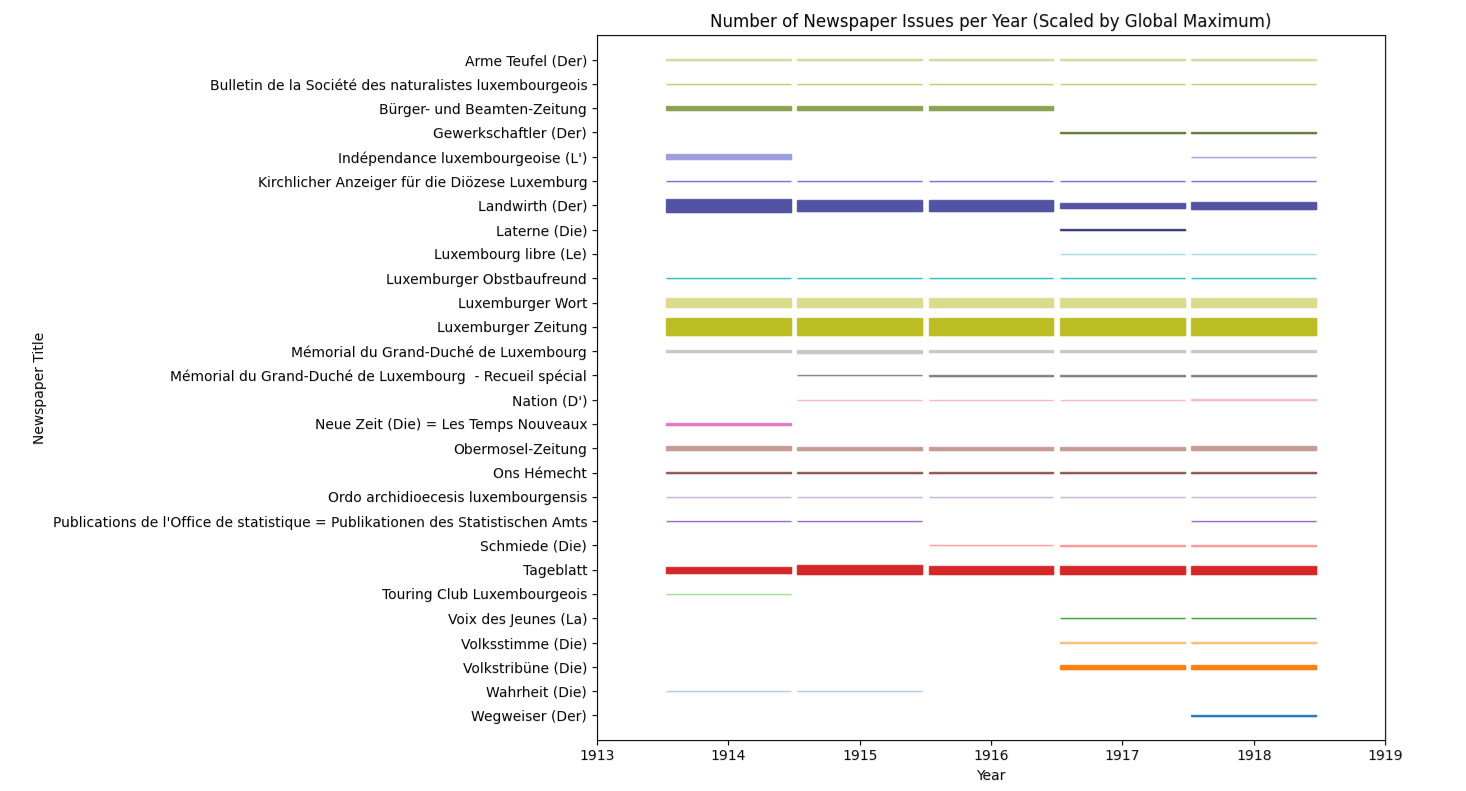
Using the digitised collection available on eluxemburgensia.lu, the project produces a meaningful list of potential sources for further research. Users enter a start and end date to identify newspapers circulated during the period, thereby gaining insight into the density of publication of the selected period. This can then be used to target specific newspapers in which to drill-down for specific articles. For this example, we will look at the period of the reign of Grand Duchess Marie Adelheid during WWI who ascended to the throne in 1912 and who, due to political pressure regarding her activities during WWI, abdicated in 1919.
The BnL provides information about digitised newspapers and serials available on the eluxemburgensia.lu portal as a list in json format with details about each publication. This includes the main metadata of each title, but not any full text. We will use the publication start and end dates to determine if the newspaper should be selected for inclusion in the final results.
Jupyter Lab is used to encapsulate all the information regarding the project in a single notebook and Python is used as the programming language. The Jupyter notebook is available on GitHub: https://github.com/natliblux/OpenBNL-Plotting.
The project consists of four steps:
- Requesting the start and end dates of the period to investigate from the user;
- Retrieve the eLuxemburgensia collection;
- Filter the collection based on the period start and end dates to keep only those entries published during the selected period;
- Prepare, format and display the visualisation.
Requesting the start and end dates
Requesting and receiving input from the user is a simple call to the input method. A while loop is used to ensure that the user provides data rather than just pressing Enter. As well, a check is made to ensure correct dates have been entered. If the date entered is incorrect, the user will be re-prompted to enter a correctly formatted date.
# Request the start date from the user
while (True):
    input_date = input("Enter the start date (dd/mm/yyyy):")
    try:
        start_date_value = datetime.strptime(input_date,'%d/%m/%Y')
        break
    except:
        print("Please enter a valid date in the format dd/mm/yyyy.")
In our example, the start date is set to 28/07/1914 and the end date to 11/11/1918.
Retrieve the eLuxemburgensia collection
We use the requests library to retrieve the collection and immediately convert it to json format.
# get the BnL eluxembourgensia collection
elux_collection =
  requests.get("https://viewer.eluxemburgensia.lu/api/viewer2/cms/v2/digitalcollections")
elux_collection = elux_collection.json()
Filter the collection
Filtering is where the crux of the work happens in this project. For each newspaper in the collection, we will compare the newspaper start and end dates to ensure it was published during our period. We will also retrieve the count by year data to retrieve the data for the selected period only. If no data exists for the given period, then we will not include this newspaper in our final list.
Step 1: check that start and end dates
To do this, we check that the start date of the newspaper is before or equal to our period end date, meaning that the newspaper began publishing before the end of our period. At the same time, we verify that the end date of the newspaper is equal to or after our period start date. This ensures that the newspaper stopped publishing after the start of our period. With these two conditions, we confirm that the newspaper was being published within the given timeframe.
# check that newspaper start and end date falls within the specified period
 if newspaper_start_date <= end_date_value.strftime("%Y-%m-%d")
   and newspaper_end_date >= start_date_value.strftime("%Y-%m-%d"):
For example, the newspaper “Kéisecker info (De)” has a start date of “1982-04-01” and it does not have an end date. When we compare “1982-04-01” to “1918-11-11”, as it is not less than or equal to “1918-11-11”, this newspaper is not included in the final list.
Step 2: retrieve the count by year data
Again, we use the requests library to retrieve the data for the given newspaper and convert it to json format.
newspaper_countbyyear_result =
   requests.get("https://viewer.eluxemburgensia.lu/api/viewer2/collections/"
   + newspaper_paperid + "/countByYear")
newspaper_countbyyear = newspaper_countbyyear_result.json()
Step 3: select the count by year data
First, we check the status of the request to get the count by year data. Not all newspapers have this data and therefore, we are only interested in the ones where this data exists.
if newspaper_countbyyear["status"] == "OK":
    # only keep data for the years we are interested in
    countbyyear_data = {}
    for data_entry in newspaper_countbyyear["data"]:
        if data_entry["year"] >= start_date_value.year
          and data_entry["year"] <= end_date_value.year:
            countbyyear_data.update({data_entry["year"]:data_entry["n"]})
We extract the data for the years in our selected period and store it in a dict object.
Lastly, if we have count by year data, we add the newspaper to our filtered collection, otherwise, we skip to the next newspaper.
# if nothing in the count by year data then skip this newspaper
# and move to the next one.
# this shouldn't happen since we've already checked that the newspaper
# was published during our selected time frame.
if len(countbyyear_data) == 0:
    continue

# add the current newspaper to the final list
newspaper_dict.update({newspaper["title"]:countbyyear_data})
At this point, the newspaper dict now contains a list of key-value pairs using the newspaper title as the key and the count by year dict as the value:
Letzeburger (De)':
{1900: 52,
 1901: 52,
 1902: 52,
 1903: 52,
 1904: 52,
 1905: 53}
Prepare, format and display the visualisation
There are three preliminary steps before creating the visualisation:
- Sort the final list by the newspaper titles so they display in alphabetical order;
- Create a sorted list of all the years to be plotted;
- Determine the maximum value in the entire collection.
These steps are fully documented in the code snippet below:
# sort the newspaper list by the titles once in the series list
series_names = sorted(list(newspaper_dict.keys()), reverse=True)

# Create an empty set to store unique years
all_years_set = set()
# Loop through each inner dictionary (series)
for series in newspaper_dict.values():
    # Loop through each key in the inner dictionary
    # (Looping over a dict directly iterates over its keys)
    for year in series:
        # Add the year to the set (automatically avoids duplicates)
        all_years_set.add(year)
# Convert the set to a sorted list
all_years = sorted(all_years_set)

# Set the global max to it's initial value
global_max = None
# Loop through each inner dictionary (series)
for series in newspaper_dict.values():
    # Loop through each value inside the inner dictionary
    for value in series.values():
        # check if this is the first entry or the value is greater
        # than the global max.
        # if so, set the new global max
        if global_max is None or value > global_max:
            global_max = value
To give each newspaper its own colour, a colour palette is created. As can be seen in the code below, the colour palette is limited to 60 colours. If there are more than 60 newspapers in the final collection, the programme will end.
# ---- Build color palette (up to 60 colors) ----
palette = (
    list(plt.get_cmap("tab20").colors) +
    list(plt.get_cmap("tab20b").colors) +
    list(plt.get_cmap("tab20c").colors)
)

# Ensure there are enough colours for the number of series
if len(series_names) > len(palette):
    raise ValueError("Too many series for the available color palette")

# set a colour for each series
series_colours = {
    series: palette[i]
    for i, series in enumerate(series_names)
}
We then draw a rectangle for each newspaper weighting the values displayed by the global maximum value calculated earlier.
# ---- Draw rectangles ----
for y_idx, series in enumerate(series_names):
    y_center = y_idx
    colour = series_colours[series]

    for year in all_years:
        value = newspaper_dict[series].get(year, 0)
        if value == 0:
            continue

        height = (value / global_max) * max_box_height

        rect = Rectangle(
            (year - year_width / 2, y_center - height / 2),
            year_width,
            height,
            facecolor=colour,
            edgecolor=colour
        )
        ax.add_patch(rect)
Lastly, some formatting is done and the plot is displayed.